
Scraps, outline & compare
The three workshop views around the manuscript: a drawer for cut lines, a wall of poem cards, and Then beside Now.
Scraps — the drawer for cut lines
Poem books carry a Scraps tab. Cut a line or a stanza with Alt+Shift+X and it waits there for another poem — tagged with the poem it came from. (On macOS the chord types the Greek letter Ξ instead, so it is unavailable there.) Open the drawer, pick a scrap, and Put in returns it at your caret. Nothing is deleted; nothing is lost.
Drag a scrap card onto a poem and it lands at the drop point; the poem shows it is a drop zone.
Outline — the whole collection as cards
The Outline tab turns every poem into a card: title, first line, line count, and a status dot. Rearrange the collection at a glance; the cards are also where you see a poem’s outline note.
Compare — Then beside Now
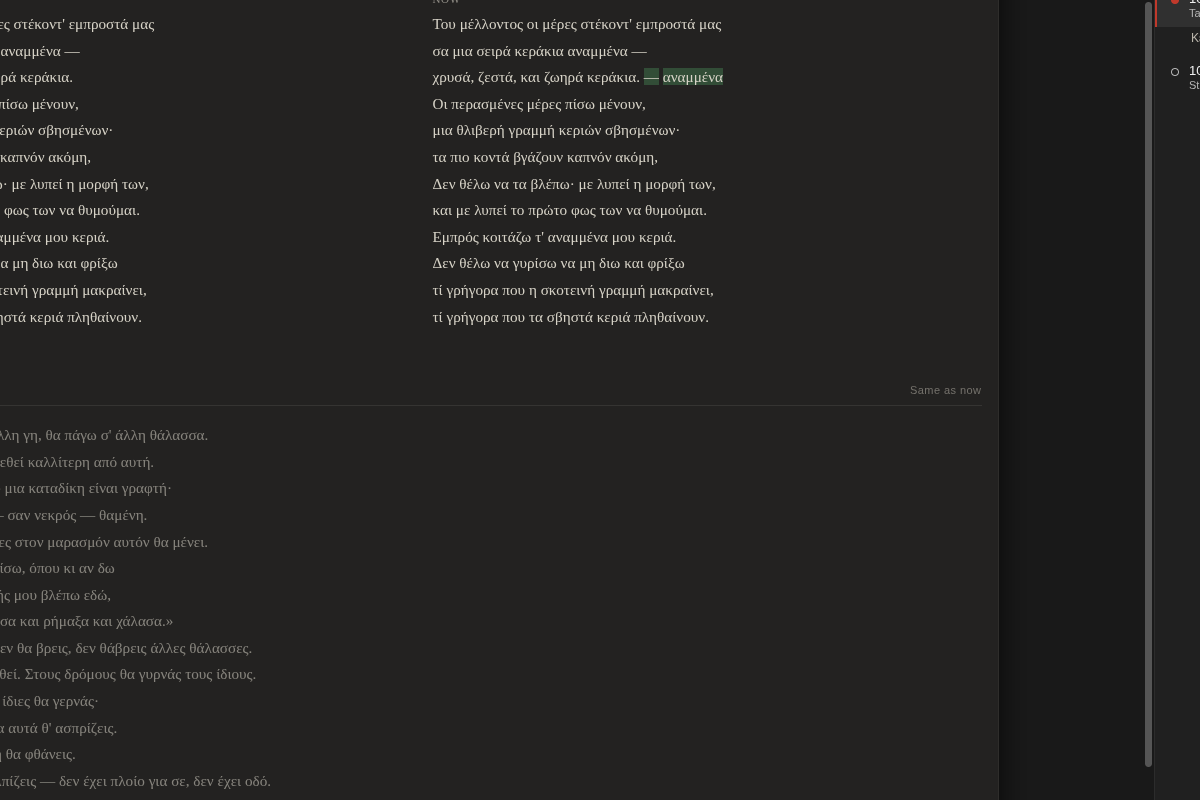
Take a snapshot (Ctrl+S), keep writing, then open the snapshot from the Darlings tab: Rhema sets Then next to Now, column by column, marking the words added since. Watch a poem grow across a month, or lift a line back out of last week.
Start here: getting started · The safety net behind it: settings & snapshots.