
Settings & snapshots
Darlings, daily snapshots, Then/Now compare, backups with retention you choose, and the local AI endpoints.
The safety net
- Darlings — kill a passage without remorse: select it, send it to Darlings, and its words wait there, restorable to their original spot.
- Snapshots — Ctrl+S takes one on demand (Take Snapshot); Rhema also takes one automatically every day.
- Trash — Move to Trash sends the book’s folder to your system trash, where you can recover it; taking a book off the shelves leaves its files safe in the library folder.
Then / Now
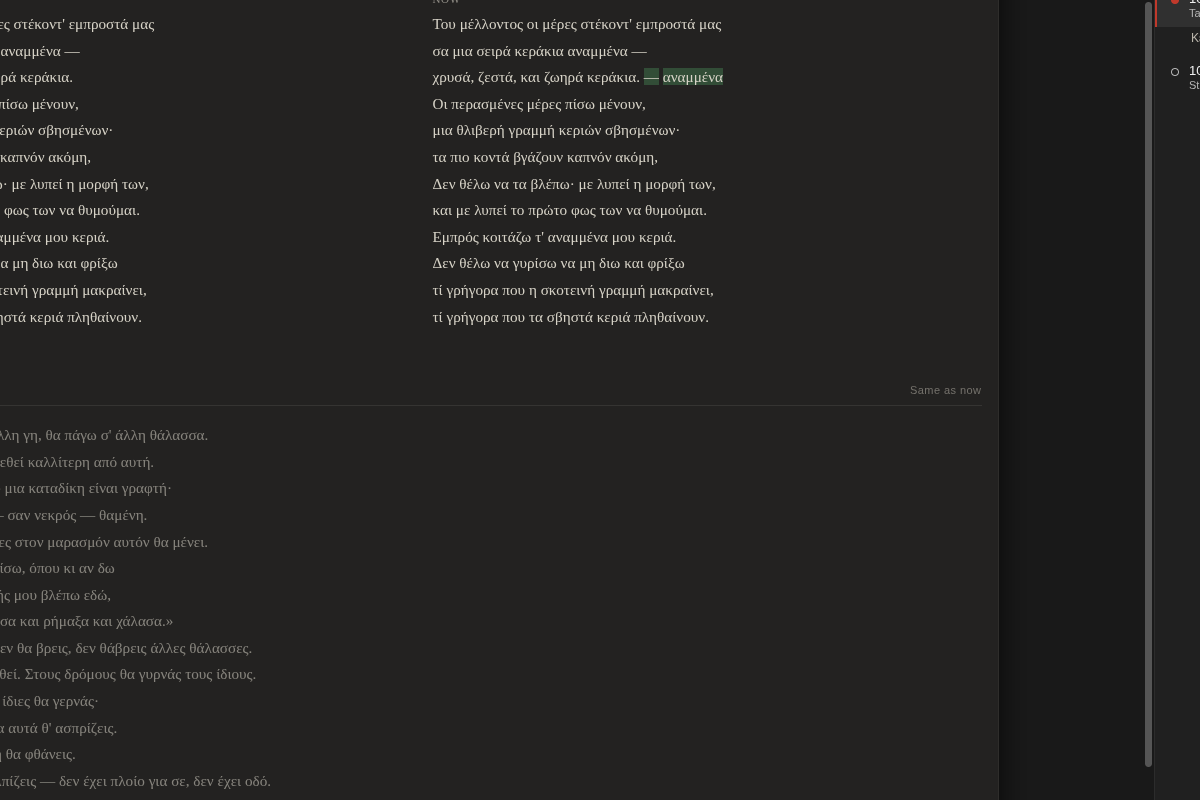
Open a poem’s Darlings tab and see Then beside Now — an earlier snapshot next to the living text, with added words marked. Watch a poem grow, or lift a line back out of last month.
Backups you control
File → Rhema Settings… — continuous autosave is always on; daily zip backups keep the copies you choose, including unlimited (“Απεριόριστα” never deletes). Everything stays plain files on your disk.
The poet’s AI — local, and never in your text
In the same settings window, point Rhema at a local OpenAI-compatible model and (optionally) ComfyUI on the same machine. When the addresses point to this computer, nothing leaves it.
- Reader’s Eye… (Ctrl+Shift+E, or the poem’s menu): the model reads the poem and files 3–5 concrete observations in the notes pane — in the poem’s own language. It never writes into the poem. Ever.
- Suggest titles… for an untitled poem; accepting one sets the title, not the text.
- With no endpoint configured, the app simply never offers AI.
Start here: getting started.