
Local AI setup
Point Rhema at a language model that lives on your own machine — the settings pane, the Test button, and what each field means.
Rhema’s AI features — the Reader’s Eye, painted covers, poem drawings — run on your models. Nothing is rented, nothing phones home: when the addresses point to this computer, your poems never leave it.
Open the pane
File → Rhema Settings… The first section is the AI.
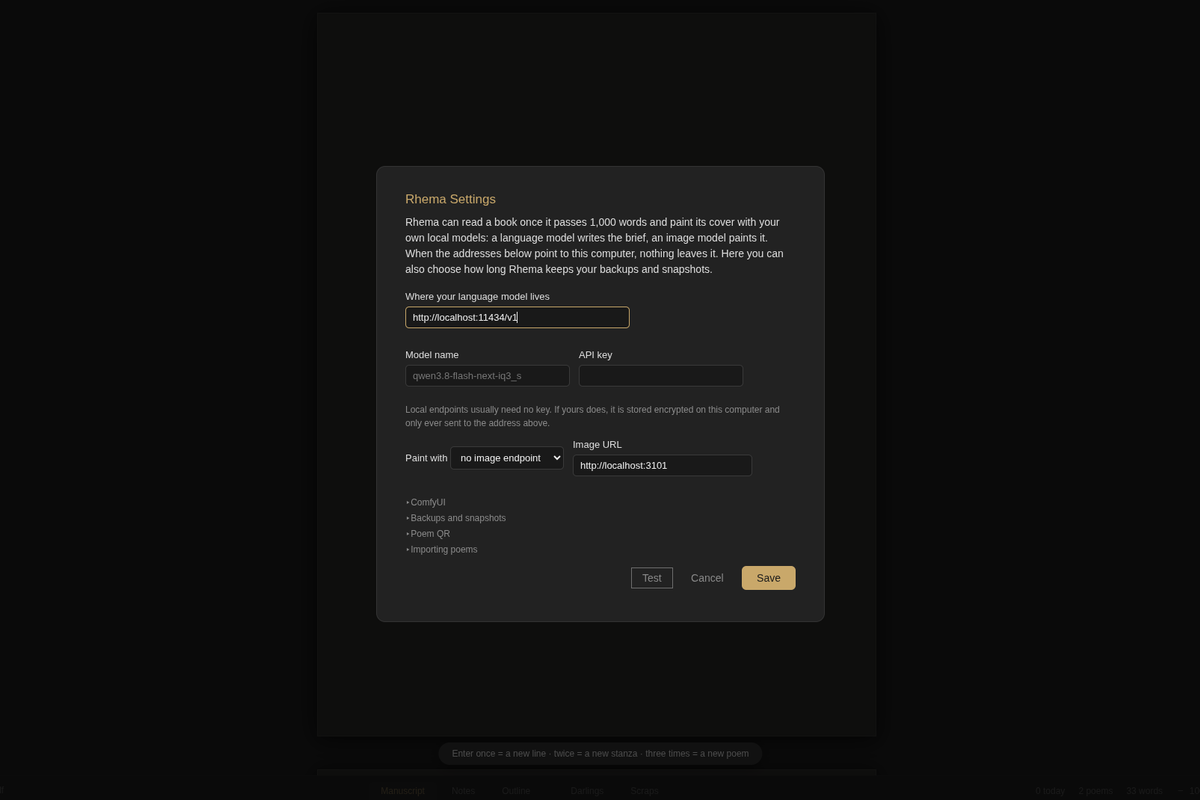
The text endpoint
- Where your language model lives — the base URL of any
OpenAI-compatible server. The default,
http://localhost:11434/v1, is where a local model server with an OpenAI-compatible API usually listens. If your server lives elsewhere, put its address here. - Model name — exactly what your server calls the model.
- API key — local endpoints usually need none. If yours does, the key
is stored encrypted on this computer, outside your library folder, and
only ever sent to the address above. Type
removein the box to forget it.
The picture endpoint (optional)
Paint with chooses where covers and illustrations come from:
- ComfyUI — set Image URL (the default is
http://localhost:3101) and, under the ComfyUI disclosure, the Checkpoint file your workflow should use. The painting workflow is built for you; a custom ComfyUI API workflow (with{{POSITIVE}},{{SEED}}…) can be set in the library file. - Nothing — leave it unset and Rhema simply never paints. With only a text endpoint, line drawings still work: the model draws them as SVG itself.
Test before you write
Press Test. Rhema pings both endpoints and answers in plain words:
✓ ok — 12 models— the server answered.can't be reached — is the model server running?— start your server, or fix the address.asked for a key — type it in the API key box, Save, then Test again.
Then Save. The result line reads Text: … · Paint: … so you can see
which half works.
What Rhema does with it
- Reader’s Eye — reads a poem, files observations in the notes.
- Suggest titles… — five candidate titles, never touching the text.
- Covers — once a book passes 1,000 words, Rhema can paint its cover: the language model writes the brief, the image model paints. About a minute, on your own machine.
- Poem drawings — a line drawing or illustration at the foot of a poem.
Every one of these is opt-in: with no endpoint configured, Rhema never offers them.
Start here: getting started · Go deeper: Reader’s Eye.